
Build a Weekly Price-Watch Email in n8n With the Trawl Node
One n8n workflow, three scrapers and a Code node: a Monday email with competitor prices side by side. Everything tested, costs and limits included.

By the end of this tutorial, n8n sends you one email every Monday with the prices from several web pages, side by side in one table, the cheapest one highlighted. We send the same kind of mail to small hotels every Monday: their own rate next to the cheapest reseller and the hotels around them, night by night. How we send small hotels a Monday price mail shows that mail. This tutorial builds the smallest version of it, on pages you choose. You need an n8n you can install community nodes on, a Trawl account, and an SMTP mailbox (we used a local test inbox, so nothing left our machine).
Why not just the HTTP Request node?
If you landed here by searching "n8n HTTP Request returns empty HTML", check one thing first: is the price in the page source at all? Open the page, view the source and search for a price you can see on screen. If it is not there, the page builds it in the browser, and a plain request never sees it. Open the browser's Network tab, look for the request that carries the data and call that one yourself. If it is there, the HTTP Request node can read it.
We ran that check on the page we use in this tutorial, a collection of Shopify's public demo store: https://checkout.hydrogen.shop/collections/backcountry. In n8n, a GET on that address, followed by a Code node that counts what came back, gave this in October:
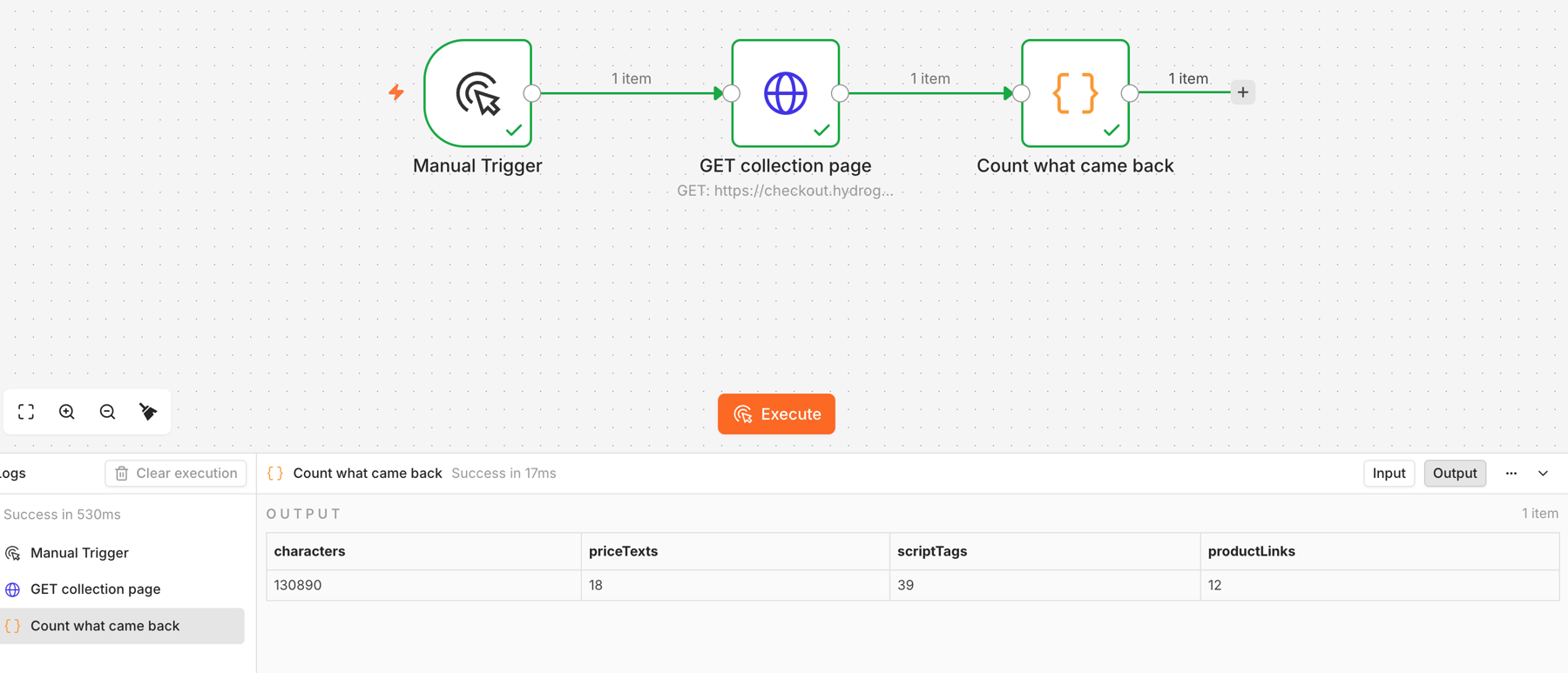
So the claim we expected to make is false here: the prices are in the HTML, because this store renders them on the server. A plain HTTP Request node does work on this page. What you get is one big string. To turn it into rows you add parsing nodes with selectors tied to the theme's markup, and you rewrite them when the theme changes. The HTML of the page holds 12 product links, while the scraper below returned 26 rows for the same collection. Our own curl requests to the shop started to answer HTTP 429 after a handful of calls. And nothing in n8n repairs the parsing for you.
That is what the Trawl node is for. It runs a scraper that already knows the page, and hands n8n clean rows, one item per product. Trawl keeps the scraper working, with Auto-fix when a page changes. Plenty of other price pages do hide the data behind a token or a script call, and there a browser run is the only way in. The rest of this tutorial builds the weekly mail with the node.
Build the scrapers
A competitor watch has one page per competitor. This demo store has one seller, so the three scrapers below read three collections of it and play the part of three competitors. With real competitors you would watch the same product on each seller's page.
- Backcountry:
https://checkout.hydrogen.shop/collections/backcountry - Freeride:
https://checkout.hydrogen.shop/collections/freeride - Winter:
https://checkout.hydrogen.shop/collections/winter
Sign up at trawl.me and create the first scraper from one sentence. The walkthrough is in Build Your First Scraper From One Sentence. We built ours with the Trawl CLI, which uses the same generator as the web wizard:
trawl create https://checkout.hydrogen.shop/collections/backcountry \
  --prompt "Every product listed on the page, \
with its name and its price in dollars."
The generator writes a new script on every build, so look at what yours gives before you go on. Our build in November, on Trawl CLI 4.0.4, ended with a table of 12 rows: the products on the first page of the collection. Trawl raised the proxy tier by itself, to tier 3, and chose the columns name, price, priceValue, originalPrice and url.
Check the prices before you trust the table. When we copied that script to three scrapers and ran them, every price came back empty, while the names and links were fine. Trawl marked the runs as failed, and Auto-fix rewrote the price part of the script: it now has a second way to find the price block, and it accepts other currency signs than the dollar. That fix worked, but a price watch should not depend on how a page displays a price. A product feed gives the number itself.
So we replaced the generated script with one that reads the store's product feed, with country=US in the address. Every price comes back as a number in US dollars, and the feed holds every product of the collection, not just the first page. The script reads the address it is given, so the same file works on the three collections. Save it as shop.js:
var page = await browser.newPage();
await page.goto(TRAWL.url, { waitUntil: 'domcontentloaded' });
const start = Date.now();
const base = new URL(TRAWL.url).origin
  + new URL(TRAWL.url).pathname.replace(/\/$/, '');
const result = [];
let truncated = false;
for (let p = 1; p <= 20; p++) {
  if (Date.now() - start > 7 * 60 * 1000) { truncated = true; break; }
  const items = await page.evaluate(async (u) => {
    const r = await fetch(u, { credentials: 'include' });
    if (!r.ok) return null;
    const j = await r.json();
    return j.products || [];
  }, base + '/products.json?limit=250&country=US&page=' + p);
  if (!items || !items.length) break;
  for (const pr of items) {
    const prices = (pr.variants || []).map(v => parseFloat(v.price))
      .filter(x => !isNaN(x));
    const min = prices.length ? Math.min(...prices) : null;
    const cmp = (pr.variants || [])
      .map(v => parseFloat(v.compare_at_price)).filter(x => !isNaN(x));
    result.push({
      name: pr.title,
      price_usd: min,
      price_text: min !== null ? '$' + min.toFixed(2) : null,
      regular_price_usd: cmp.length ? Math.min(...cmp) : null,
      url: new URL('/products/' + pr.handle, base).href
    });
  }
  if (items.length < 250) break;
  await new Promise(r => setTimeout(r, 1000));
}
if (truncated) result.forEach(r => r.truncated = true);
returnData(result);
await page.close();
Put it on the first scraper, rename that scraper Backcountry, then create the two others from the same file. You will need these exact names in n8n.
trawl scraps update <backcountry_id> --title Backcountry \
  --tier tier2 --request "$(cat shop.js)"
trawl scraps create --title Freeride --tier tier2 \
  --url https://checkout.hydrogen.shop/collections/freeride \
  --request "$(cat shop.js)"
trawl scraps create --title Winter --tier tier2 \
  --url https://checkout.hydrogen.shop/collections/winter \
  --request "$(cat shop.js)"
The script returns 26 rows for Backcountry, 15 for Freeride and 13 for Winter, with the columns name, price_usd, price_text, regular_price_usd and url. The Code node below reads price_usd. A copy has no schedule and no digest mail. After scraps create --tier, CLI 4.0.4 warns that the server did not confirm the tier change. Check with trawl get <id>: on both copies the tier was set.
Know the cost before you build. On our DEV test account, building the first scraper used about 6,700 compute: 5,774 for the AI that writes the script, the rest for its test runs and its first run. A free account holds 10,000 compute, so it covers one build of this kind and a few weekly mails on top, not two builds. The copies cost nothing to build. The Auto-fix that rewrote the price part used 6,018 compute on its own, so while you are still trying a script out, turn Auto-fix off with trawl scraps update <id> --no-autofix and turn it back on with --autofix once the rows look right. Check the figures on your account's usage page first, because the price on the live product can differ from our DEV environment. The pricing page lists the plans.
The first scraper also came with a weekly schedule (Mondays at 7) and a weekly digest mail. Here n8n owns the schedule, so we switched both off with trawl scraps update <id> --no-cron --no-digest. Scheduled runs use compute too, on top of the ones n8n starts. We only measured runs started through the API.
Create an API key limited to those scrapers
Open Developers, stay on the API Keys tab and click Create Key. The dialog has a Name, a required Expiry (up to two years) and an optional Scope. Pick your three scrapers in the scope field, and the key reaches nothing else. We checked: a scoped key used on another scraper came back as 403 with "API key not scoped to this scrap".
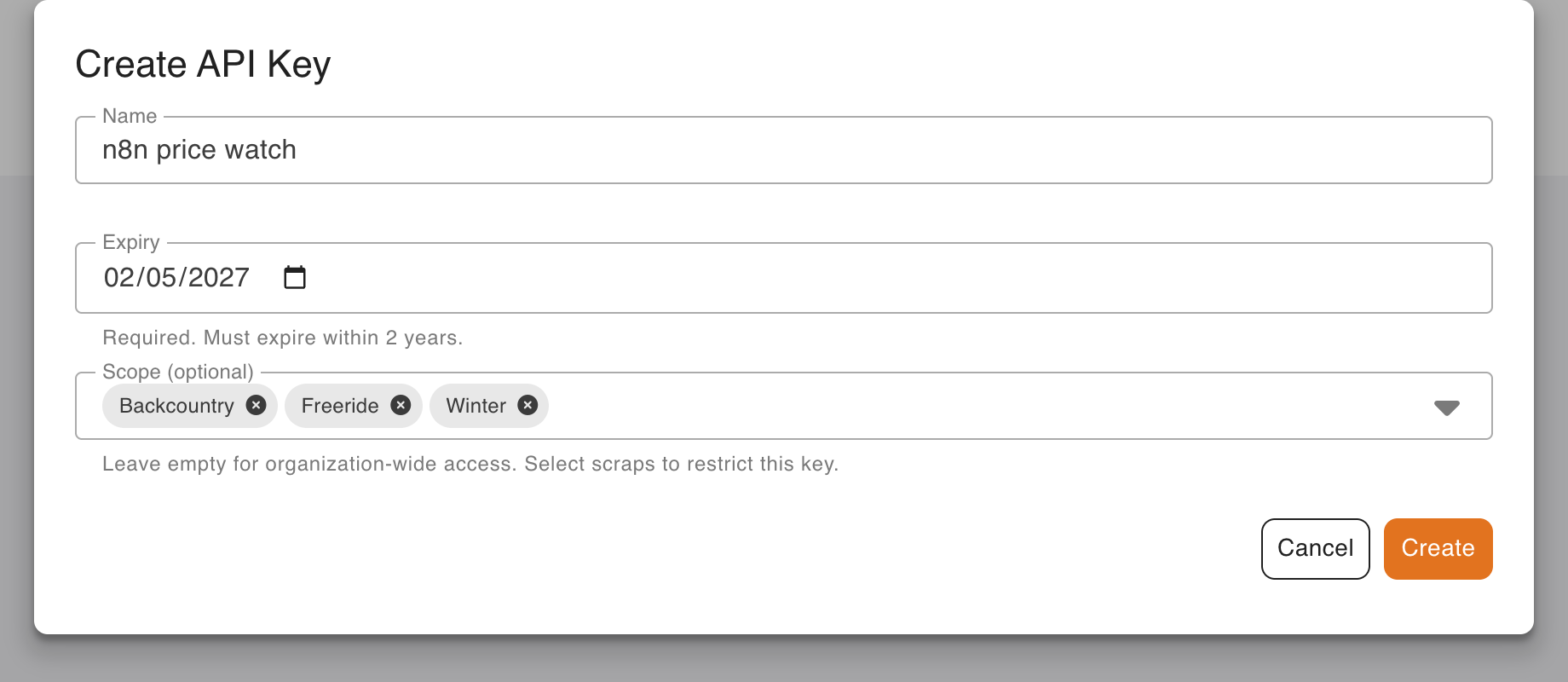
Click Create. The key starts with trawl_ and is shown once, under "Copy this key now. It won't be shown again." Copy it. Also copy the id of each scraper from its address bar: 24 letters and digits after /scraps/.
Install the node and add the credential
The node is an npm package, @trawlme/n8n-nodes-trawl, with its source on GitHub. We tested version 0.1.2, the one npm installs by default. A 0.1.3 appeared under the next tag the day we finished; we did not test it. On a self-hosted n8n, open Settings, then Community nodes, click Install, type the package name, tick the box about unverified code and install. n8n lists the package with one node, Trawl. Per n8n's installation guide, only the Owner and Admin roles can do this.
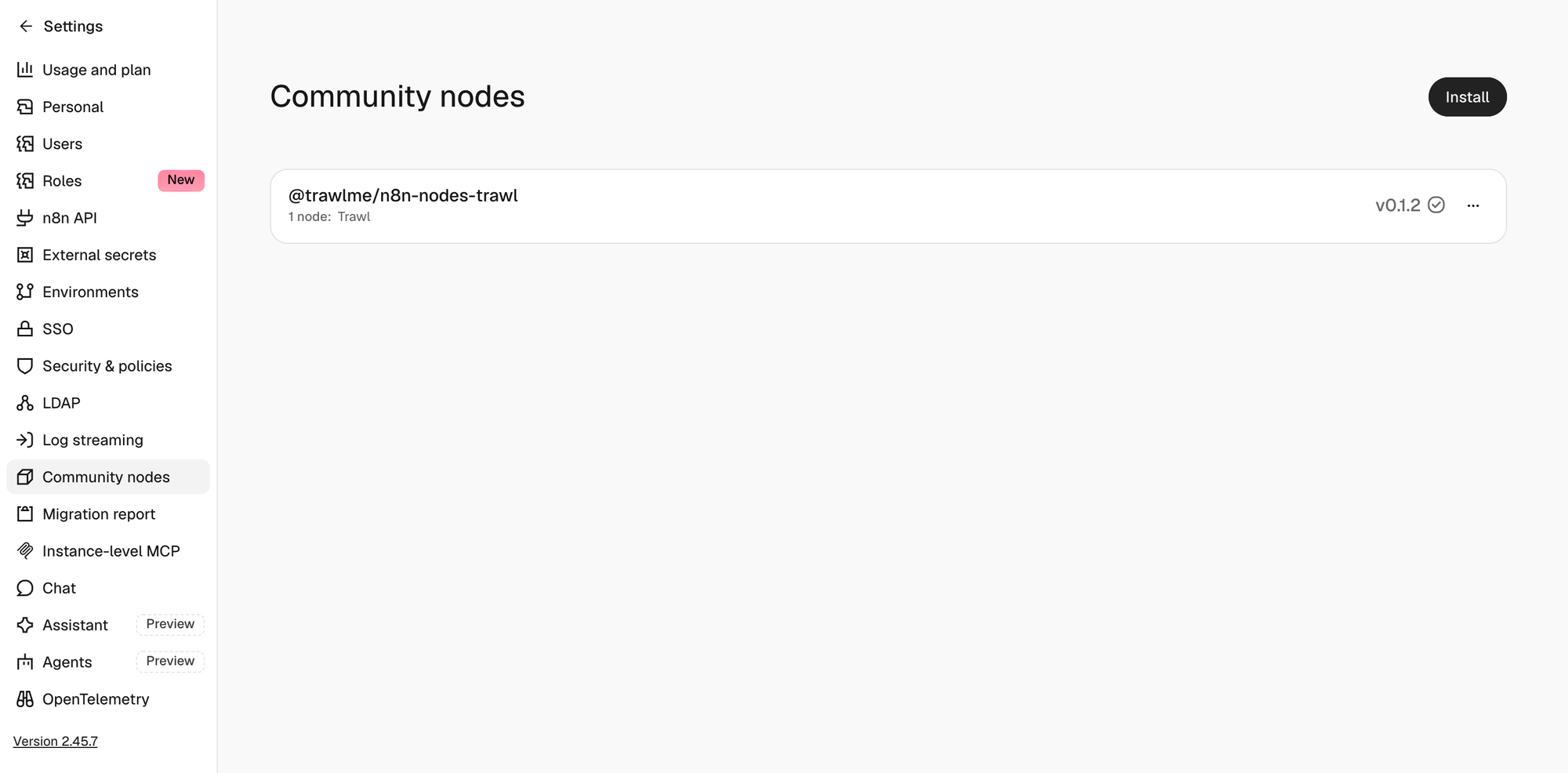
Everything here ran on n8n 2.45.7, installed with npm on a Mac, on a fresh instance. n8n's documentation says "Unverified community nodes aren't available on n8n cloud and require self-hosting n8n." On Cloud, jump to the HTTP Request section below.
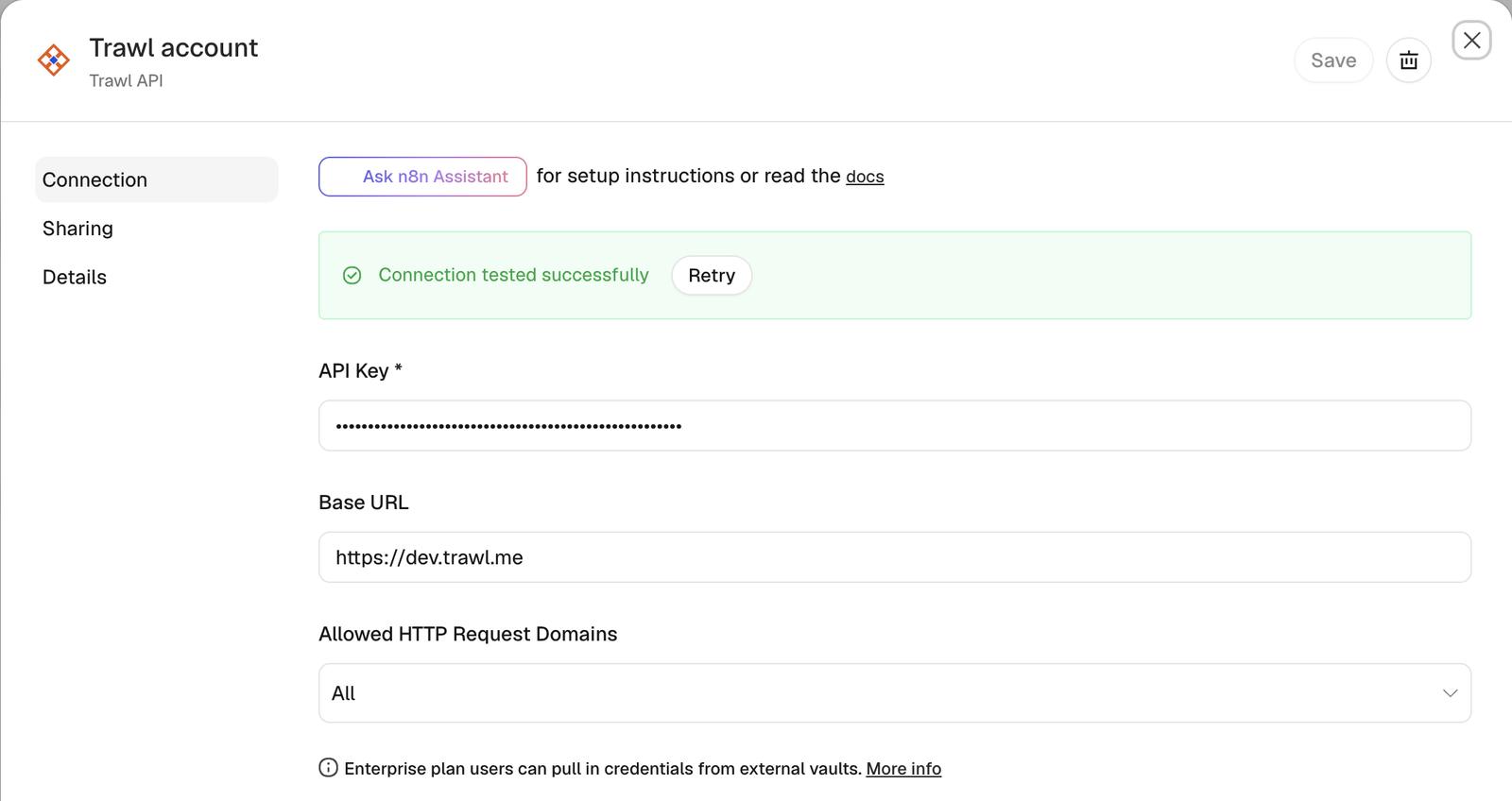
Add a Trawl node, open it and create a credential of type Trawl API: paste the key into API Key and leave Base URL on its default. n8n tests it when you save.
Build the workflow
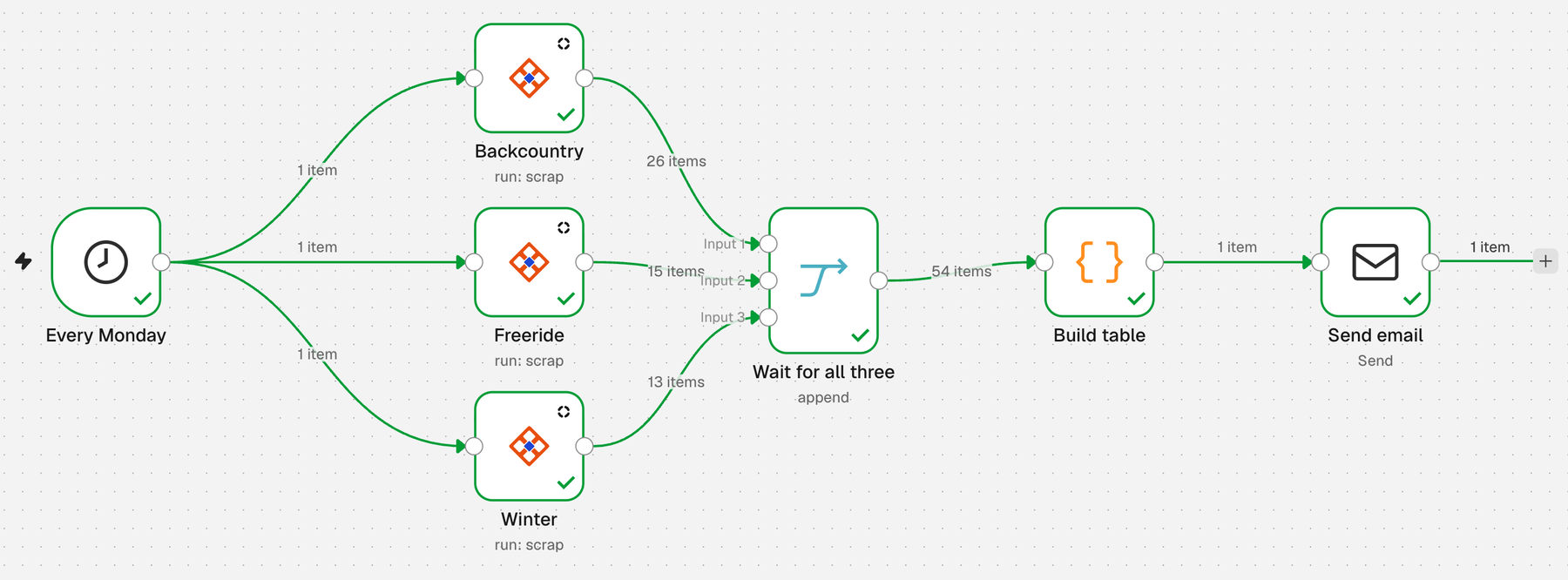
You can import our file, trawl-n8n-shop-price-watch-workflow.json (menu, Import from File), then pick your two credentials and paste the three scraper ids where the placeholders are. Or build it by hand. Seven nodes:
- Schedule Trigger, named "Every Monday": every week, on Monday, at 7.
- Three Trawl nodes, all connected to the trigger and named Backcountry, Freeride and Winter. In each: Resource Scrap, Operation Run, the scraper picked By ID, Wait for Result on, Parameters
{}, Output Rows. Turn on the node setting Always Output Data, so a page with zero rows still lets the flow continue. Do not chain them one after the other: a Trawl node runs once for every item it receives, and each page would run once per row of the page before it. - Merge, named "Wait for all three": mode Append, 3 inputs, one per branch. It holds the flow until all three scrapers are done, so the next node runs once.
- Code, named "Build table". It reads each branch by node name and builds the table:
const pages = ['Backcountry', 'Freeride', 'Winter'];
const money = n => '$' + Number(n).toFixed(2);
const td = (value, extra = '') =>
  '<td style="padding:8px 12px;' + extra + '">' + value + '</td>';

const stats = pages.map(page => {
  const rows = $(page).all()
    .map(item => item.json)
    .filter(row => row.name && row.price_usd != null);
  if (!rows.length) return { page, count: 0 };
  const cheapest = rows.reduce((a, b) => (b.price_usd < a.price_usd ? b : a));
  const avg = rows.reduce((sum, r) => sum + r.price_usd, 0) / rows.length;
  return { page, count: rows.length, cheapest, avg };
});

const found = stats.filter(s => s.count);
const lowest = found.length
  ? Math.min(...found.map(s => s.cheapest.price_usd))
  : null;
const green = 'background:#d1fae5;font-weight:bold;';

const lines = stats.map(s => {
  if (!s.count) return '<tr>' + td(s.page) + td('No rows') + '</tr>';
  const best = s.cheapest.price_usd === lowest ? green : '';
  return '<tr>' + td(s.page) + td(s.count)
    + td(money(s.cheapest.price_usd), best) + td(s.cheapest.name)
    + td(money(s.avg)) + '</tr>';
}).join('');

const head = ['Page', 'Listings', 'Lowest price', 'Cheapest item', 'Average']
  .map(h => '<th style="padding:8px 12px;">' + h + '</th>').join('');
const html = '<h2>Weekly price watch</h2><table>'
  + '<tr style="text-align:left">' + head + '</tr>' + lines + '</table>';

const subject = lowest === null
  ? 'Weekly price watch: no prices this week'
  : 'Weekly price watch: lowest price ' + money(lowest);

return [{ json: { html, subject } }];- Send Email: From and To addresses, subject
{{ $json.subject }}, format HTML, and{{ $json.html }}as the HTML. Create an SMTP credential for it. We pointed ours at a local test inbox on port 1025 with no login. For a real mailbox, use your provider's host, port and login. The Gmail node can send the same HTML. We did not test it.
The table is plain inline-styled HTML, which mail clients handle better than a stylesheet. The cheapest price gets a green cell. Two pages tie at $500.00 in our run, so both cells are green. The Code node also writes the subject line. If no page returns a price, the subject says so instead of showing a broken number: our first run, with the empty prices, taught us that one.
Run it and read the result
Click Execute at the bottom of the canvas. The three scrapers ran one after the other, for 68, 65 and 41 seconds, and the whole workflow took 2 minutes 54 seconds. One run cost 920 compute: 366, 193 and 361 for the three pages. We ran it by hand and did not wait for Monday. In n8n 2.45, Publish at the top right is what turns the Monday trigger on.
The email landed in our test inbox:
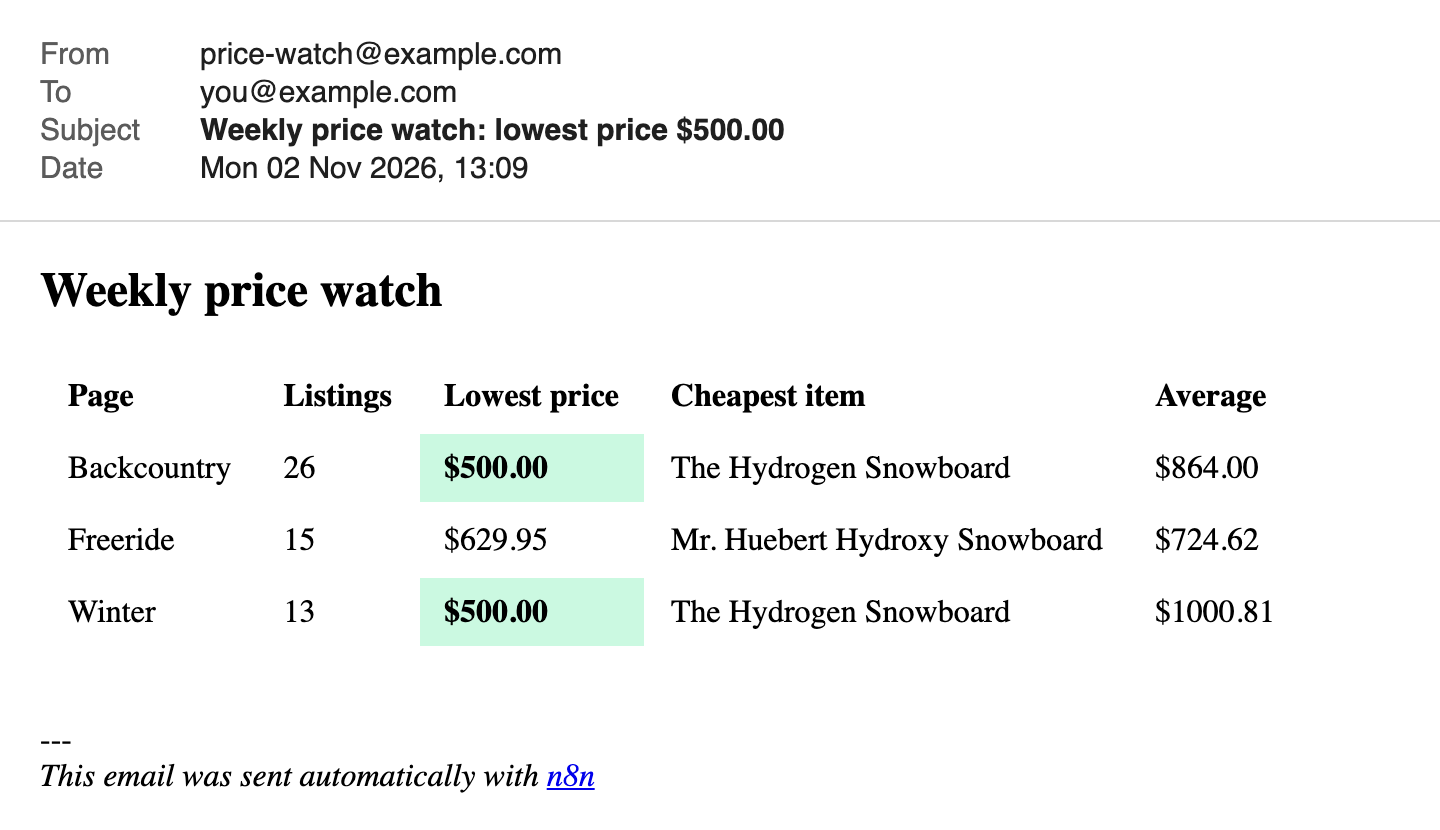
By default n8n adds a line at the bottom saying the email was sent with n8n. Each call is also recorded as a run on its scraper, with the trigger shown as api, and the Monitoring page lists failed runs with their cause, as described in what Trawl 3.2 added.
If the scrapers already run on their own schedule, you can skip the runs. Set the Trawl node's operation to Get Latest Result and it outputs the rows of the last run without starting one. On Backcountry it returned the 26 rows in 189 milliseconds and used no compute. It fails with a clear message when the scraper has never run.
Limits to know
| Topic | What happens |
|---|---|
| Run time | 41 to 68 seconds per page here. With Wait for Result on, the node waits for the run to end, so the workflow takes the sum of the three, 2 minutes 54 seconds in our run. |
| Run budget | The run route allows 60 runs per 15 minutes, counted for the account that owns the key. The response headers say so (RateLimit-Limit: 60). |
| Busy answers | HTTP 429 means retry later: the platform is at capacity, or that scraper is already running. The node fails on it by default. Set Output to Full Response to get { statusCode, body } and branch on it. |
| Failed runs | The node's description says a script that throws comes back as HTTP 422. We did not provoke one. |
| Compute | 366, 193 and 361 per page and 920 for the weekly mail here. We set the three scrapers to tier 2. The store pushed back, the runs climbed to tier 3 and tier 4 on their own, and the scrapers start at that tier from then on. In October the same three pages ran at tier 2 for 332 in total. Building the first scraper cost about 6,700 on our test account. |
| Reading without running | Get Latest Result worked on a free account. The raw route GET /api/scraps/<id>/data answers 403 PLAN_REQUIRED there. |
One thing is not covered here. We did not test Wait for Result turned off, the Parameters field, or the node on the production host.
If you cannot install community nodes
The HTTP Request node can make the same call, once per scraper. Method POST, URL https://api.trawl.me/api/scraps/worker/<scrap_id>. Authentication: Generic Credential Type, Header Auth, name Authorization, value Bearer trawl_your_key. Turn on Send Body, content type JSON, body {}. Under Options add Timeout and set it to 300000 milliseconds, because the option starts at 10000 and a run takes longer. The rows come back in data.result as one item, so add a Split Out node on that field. Name the three Split Out nodes Backcountry, Freeride and Winter and the Code node above reads them the same way. We made this call and read its response, but we did not run the whole mail through this variant.
Where to go next
Add a fourth page by copying a branch, and raise the Merge input count. Let Auto-fix repair a scraper when a page changes. Read what actually breaks a scraper in production before you rely on the Monday mail. The node's own guide is on the Trawl docs. If you run a small hotel, the hotel pilot sends this kind of mail for you, with the rates of the hotels around you.
Want this mail without writing the scrapers by hand? Start free on Trawl, 10,000 compute and no card.
Disclaimer: Trawl provides scraping infrastructure. Users are responsible for ensuring their use complies with applicable laws and website terms of service. This article is for educational purposes only.
Written by Pierre | November 2026