
The Trawl CLI in 10 Minutes: Create a Scraper, Run It, Read the Data
Install the Trawl CLI, create a scraper from one sentence, run it and read the rows as JSON. Real output from version 3.17.0, what each command costs, and how to script it with exit codes.


Four commands take you from an empty terminal to JSON you can pipe into anything: install, log in, create a scraper from one sentence, read its data. This is the whole loop with the Trawl command line, tested on version 4.0.4, with the output we actually got and the three defaults worth knowing before you automate anything.
Here is the shortest version, so you know where this ends:
npm install -g @trawlme/cli
trawl login
trawl create https://www.scrapethissite.com/pages/simple/ \
  --prompt "Every country on the page: name, capital, population \
and area in square km."
trawl data <id> --json | jq '.[0]'
The rest of the article explains what each line did, what it cost, and how to script it safely.
What you need
Node 22.12 or newer, and a Trawl account. The free plan gives you 10,000 compute once, with no card. Compute is what the AI spends writing the scraper and what each run spends afterwards, so keep an eye on it: building the scraper for the page below cost about 4,700 in our latest test (it varies with the page, and more on large or protected pages), and every run after that costs about 50 to 100. The practice page below, Scrape This Site, lists countries and is a public page built for this kind of test.
If you have no account yet, sign up on trawl.me and verify your email first. If you would rather not use a terminal, the web app builds the same kind of scraper from one sentence, and the try page shows that flow with no account.
Install and log in
npm install -g @trawlme/cli
trawl --version
trawl login
The package is @trawlme/cli. Every output below comes from version 4.0.4. Version 4 needs Node 22.12 or newer, so update Node first if npm install complains. trawl login asks for your email and password, stores a session token on your machine, and, in an interactive terminal, also installs the Claude Code skills bundled with the CLI. If you use Claude Code, restart it afterwards so it sees them.
Check that you are in:
$ trawl whoami
Alex Demo
  ID:       6ad9...e0f4
  Provider: local
  Roles:    user
(The email line is left out here.)
Signed up with Google or Apple, so there is no password to type? Skip login and use an API key instead: create one under Developers, API Keys in the app (available on every plan, Free included), then export it as TRAWL_API_KEY. The commands in this article that create, run and read scrapers accept a key. Commands that change a scraper afterwards, such as trawl scraps update, and whoami need a session login, as the README explains.
Create a scraper from a sentence
trawl create https://www.scrapethissite.com/pages/simple/ \
  --prompt "Every country on the page: name, capital, population \
and area in square km."
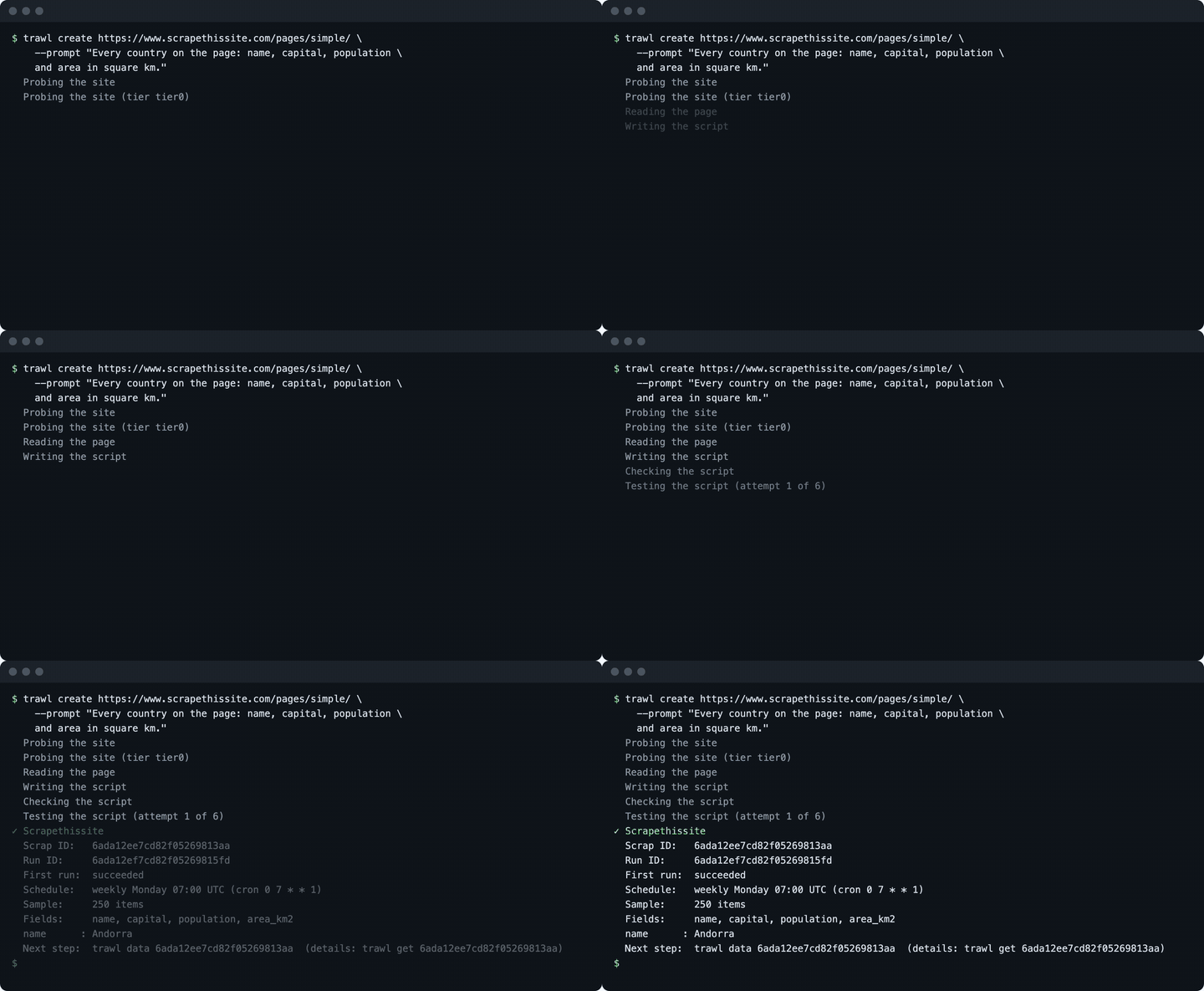
Write the prompt like a sentence to a colleague: the thing you want a row for, the fields in each row, and where it lives. There is no selector to write. Trawl opens the page in a real browser, writes the script, tests it against the live page, and saves it. It took 88 seconds on our first try and 46 on the latest one. The terminal ended with:
  Probing the site
  Probing the site (tier tier0)
  Reading the page
  Writing the script
  Checking the script
  Testing the script (attempt 1 of 6)
✓ Scrapethissite
  Scrap ID:   6ada12ee7cd82f05269813aa
  Run ID:     6ada12ef7cd82f05269815fd
  First run:  succeeded
  Schedule:   weekly Monday 07:00 UTC (cron 0 7 * * 1)
  Sample:     250 items
  Fields:     name, capital, population, area_km2
  name      : Andorra
  Next step:  trawl data 6ada12ee7cd82f05269813aa
              (details: trawl get 6ada12ee7cd82f05269813aa)
(The prompt is split over two lines, and the last line of the output is wrapped, only to fit the page.) A scrap is Trawl's word for one saved scraper: its script, its data and its schedule. Copy the Scrap ID, every other command takes it. The scraper name is derived from the host, which is why ours is called "Scrapethissite".
What create sets up for you
The summary above does not list three defaults that come with every scraper made this way.
- It scheduled itself. The command has no schedule flag. A scraper created from the CLI runs every Monday at 07:00 UTC (the web wizard uses your browser's timezone instead). Runs spend compute wherever they start from, about 50 to 100 each on a simple page. Change it with
trawl scraps update <id> --cron "0 9 * * 1", or switch it off with--no-cron. - It turned the digest on. After the first run, Trawl turns on an email summary addressed to your account email. It goes out after each later run, the weekly one and the ones you start by hand. A sent digest costs roughly 100 to 650 compute depending on how much data it summarizes, and a digest with no change costs nothing. Opt out when you create with
--no-digest, or later withtrawl scraps update <id> --no-digest. - Auto-fix is on. If the site changes its layout and the scraper breaks, Trawl tries to repair it. Self-healing scrapers explains how.
createalso has a--no-autofixflag, which its help text describes as turning auto-fix off when the first run fails.
We checked all three on the scraper above: trawl get shows the cron, and the scrap's settings show autoFix: true and a digest addressed to the account email.
The retry trap: list before you retry
create is not idempotent. If your Wi-Fi drops, or a gateway answers 502 or 504 after the work has started, the CLI exits with an error while Trawl carries on creating the scraper and running it. A blind retry then builds a second copy and pays for the AI step twice.
Two things protect you. First, Trawl refuses an identical request: the same organization, the same URL and the same sentence within about 15 minutes. Here is what we got when we ran our own command again:
$ trawl create https://www.scrapethissite.com/pages/simple/ \
    --prompt "Every country on the page: name, capital, \
population and area in square km."
✗ A scrap for this URL and goal was already created a few minutes ago
  (existing scrap id: 6ada12ee7cd82f05269813aa). Use that scrap instead of
  creating another.
$ echo $?
1
It costs nothing and hands you the id of the first one. Second, your own habit: after any network error on create, run trawl list and look for your URL before you try again. Change the wording of the sentence and the 15-minute guard no longer applies, because it is a different request.
Run it and read the data
Everything above ran the scraper once. To run it again on demand:
$ trawl run 6ada12ee7cd82f05269813aa
Scrap 6ada12ee7cd82f05269813aa run complete
run blocks until the run is finished, then prints one line and exits with 0 when the run worked. The run itself took about 30 seconds in our test, and the time varies with the site and the load. A run costs about 50 to 100 compute on a simple page. To launch a run and get your prompt back immediately, use trawl trigger <id> instead.
Reading is a different matter. trawl data returns the last saved run. It is read-only and spends nothing, so you can call it as often as you like:
$ trawl data 6ada12ee7cd82f05269813aa
Last run data:
  Items: 250
  First item keys: name, capital, population, area_km2
  Use --json for full output.
The human output is a summary. Add --json for the rows themselves, as a plain array on standard output. Each row is one country with four fields, and the numbers come as real numbers, not strings. The first one looks like this:
{
  "name": "Andorra",
  "capital": "Andorra la Vella",
  "population": 84000,
  "area_km2": 468
}
From here it is ordinary shell. This line prints the three most populated countries:
trawl data 6ada12ee7cd82f05269813aa --json \
  | jq -r 'sort_by(-.population) | .[:3][] | "\(.name): \(.population)"'
China: 1330044000
India: 1173108018
United States: 310232863
Swap the filter for jq -r '.[] | [.name, .capital, .population] | @csv' and you have a CSV, as in the picture below.
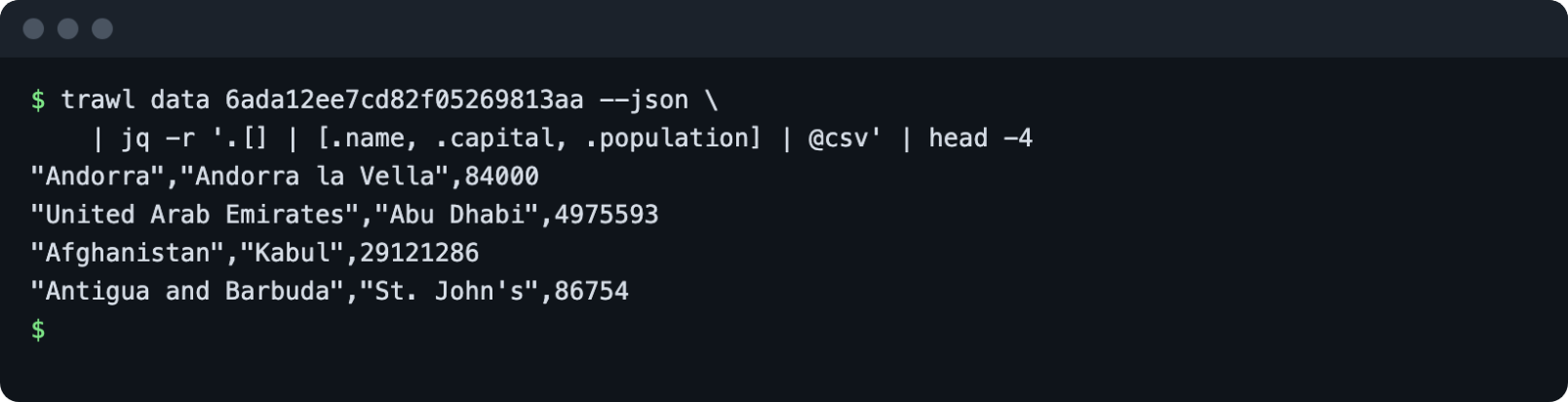
Two more read commands tell you how the scraper is doing. trawl runs <id> lists past runs, newest first (the real output also has two columns that stay empty on a healthy run, failureKind and blockType, left out here):
hid                       status   time   tier   createdAt
6ada13277cd82f0526982456  success  28259  tier0  2026-10-22T13:44:07.525Z
6ada12ef7cd82f05269815fd  success  35566  tier0  2026-10-22T13:43:11.065Z
The time column is in milliseconds. A retry loop that only checks the exit code never learns why the last run failed, so read the diagnosis first: trawl scraps doctor <id> reports the status of the last run, whether the site blocked it, and the proxy tier used. On a healthy scraper it is short:
Scrapethissite  ● success (success)
  Run ID:  6ada13277cd82f0526982456
  Blocked: no
  Proxy:   Tier 0
  Run at:  22/10/26 15:44
Note the spelling: doctor lives under scraps, there is no top-level trawl doctor. For the reasons a run can fail, see what Trawl 3.2 added.
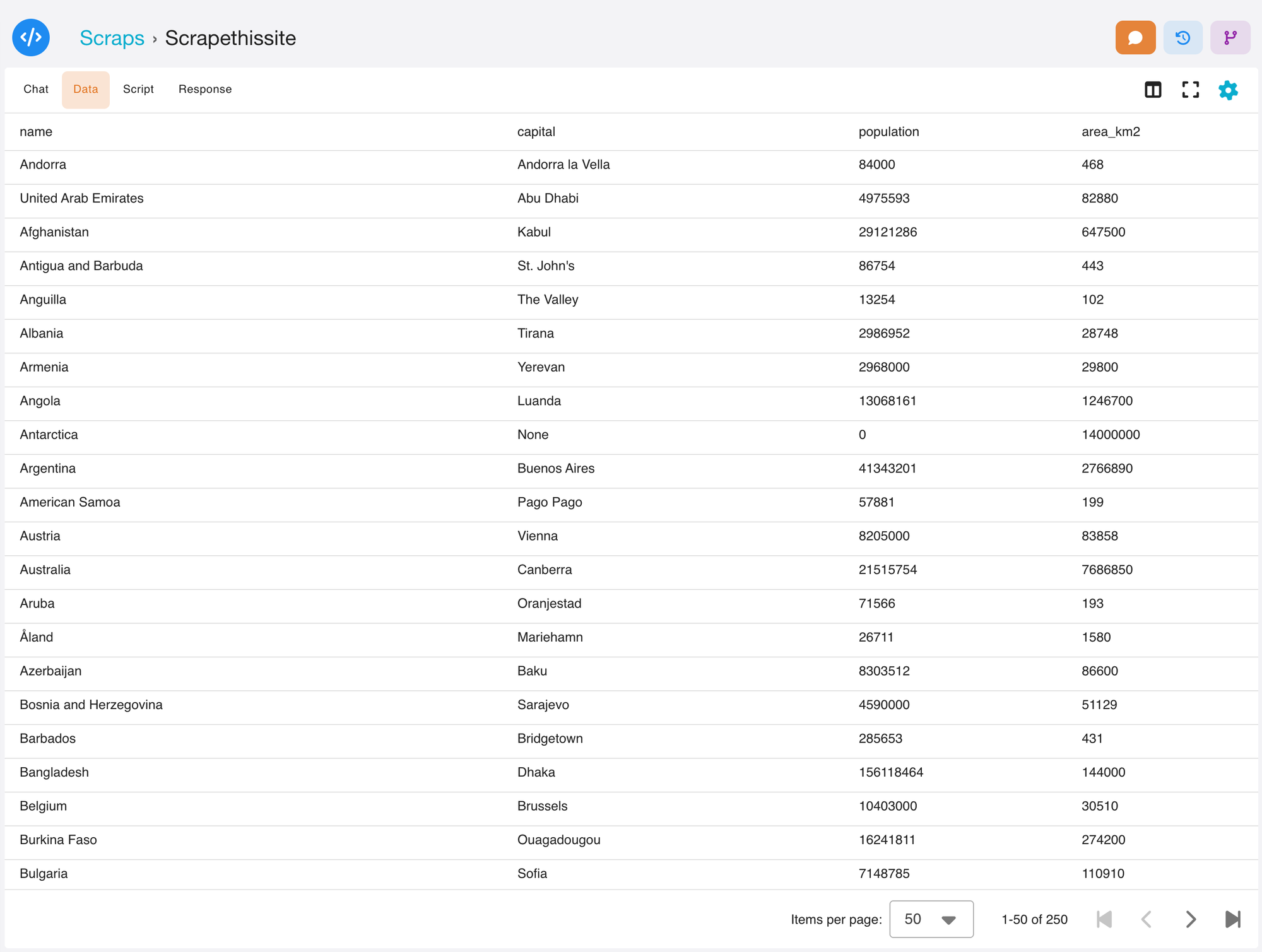
The same scraper, in the app
A CLI scrap is the same object as a web one. Open Scraps in the app and it is in your list with its data and schedule, and what you change in one place shows in the other.
Script it: exit codes and JSON errors
Every command takes --json. With it, nothing prompts, and a failure prints one error object on standard output:
{
  "error": {
    "message": "404 Not Found: No Scrap with that identifier ...",
    "status": 404,
    "kind": "not_found",
    "retryable": false
  }
}
(Printed on one line by the CLI, formatted here.)
Branch on kind and retryable, not on the message text. The exit code carries the same information, and we triggered each of these for real:
| Exit code | Meaning | What we ran to get it |
|---|---|---|
| 0 | Success | trawl data <id> --json |
| 1 | Generic error or a refusal | the duplicate create above |
| 2 | Usage error | trawl list --nope, or an id that is not 24 hex characters |
| 3 | Not logged in or token expired | trawl list with no credentials |
| 4 | Not found | trawl data 000000000000000000000000 |
| 5 | Network error | trawl list against an address nobody listens on |
Only the network error comes back with "retryable": true. For create, even that comes with the warning from the previous section: check the list first.
In a script or a CI job, skip login and pass a credential through the environment, as TRAWL_API_KEY for a key or TRAWL_TOKEN for a session token. For a job that needs no human, the key is the better fit, and the keys can be limited to specific scrapers. To keep the CLI from reporting anonymous usage, set TRAWL_TELEMETRY=0 or run trawl telemetry off.
A small example, a job that fails loudly when the last run has no rows:
#!/usr/bin/env bash
set -euo pipefail
rows=$(trawl data "$SCRAP_ID" --json | jq length)
[ "$rows" -gt 0 ] || { echo "no rows"; exit 1; }
echo "$rows rows"
Because set -e is on, a failing trawl data stops the script with its own exit code, so a missing scrap or an expired token never looks like a good run.
Cheat sheet
| Goal | Command | Costs compute |
|---|---|---|
| Create a scraper | trawl create <url> --prompt "..." | Yes, the biggest bill |
| List scrapers | trawl list | No |
| Show a scraper | trawl get <id> | No |
| Run now and wait | trawl run <id> | About 50 to 100 |
| Run without waiting | trawl trigger <id> | About 50 to 100 |
| Read the last data | trawl data <id> --json | No |
| Past runs | trawl runs <id> | No |
| Why a run went wrong | trawl scraps doctor <id> | No |
| Change or stop the schedule | trawl scraps update <id> --cron "..." or --no-cron | No |
Want to try it on a page of your own? Start free on Trawl, 10,000 free compute and no card.
Where to go next
You now have a scraper that lives on Trawl's side, runs on a schedule and answers to a one-line command. The natural next move is to put it to work: have an assistant read the same data through the Trawl MCP endpoint, which takes a Bearer token such as the API key above, or run your scrapers from a CI pipeline using the exit codes you just saw. If a run ever fails, start with trawl scraps doctor, then the post on why a run failed.
Ready to build your own? Create your first scrap on Trawl and point the CLI at a page you care about.
Disclaimer: Trawl provides scraping infrastructure. Users are responsible for ensuring their use complies with applicable laws and website terms of service. This article is for educational purposes only.
Written by Pierre | November 2026