
Get Alerted When Your Own Website Has Broken Pages (No Code or CLI)
Trawl can check a few key pages of your website on a schedule and email you when one stops showing what it should. Set it up without code or from a terminal.


Trawl can open a few key pages of your website on a schedule, the way a visitor would, and email you when one of them stops showing what it should. A deleted contact page, a booking page that now says "not found", a product that vanished after a site update: you hear about it from Trawl, not from a customer. You can set it up in the web app without code, or from a terminal in a few commands.
Two settings decide whether that mail ever reaches you, and the setup wizard leaves both for you to check. They get their own section below.
What counts as a broken page
Trawl does not judge a page by its status code. It runs a small script that opens the page in a real browser and looks for something that has to be there: a phone number, a heading, a price. If the script finds nothing, the run fails, and a failed run is what sends the mail.
Two consequences are worth knowing before you start.
- A page that disappears with a proper 404 fails the check, because the thing you asked for is not on it.
- Many sites answer a missing page with a friendly "not found" screen and a normal 200 status. A check that only reads the status would call that page healthy. A check that looks for your phone number would not.
So write your sentence around content that must be present, and say what it is. Compare:
- Vague:
Check that this page works.It does not say what a pass looks like. - Clear:
The phone number and the opening hours on the contact page. - Clear:
The name and the price of each room on the rooms page. - Clear:
The title and the price of this product.
Pick two or three pages
One scrap watches one page (Trawl calls a scraper a scrap), so "key pages" means a short list. Think of the pages whose loss would cost you a customer: the one with your phone number or booking form, the one your Google listing or newsletter links to, your best-selling product.
Each page is its own scrap. The free plan comes with 10,000 compute, no card required. Building a scraper is the expensive part, because the AI writes the script: our check on a page of our own blog cost about 1,450 compute to build, first run included, and more on large or protected pages. After that, each run costs about 50 to 100 compute on a simple page. A run that fails costs less: ours cost about 60. A summary mail that is sent costs roughly 100 to 650 compute depending on how much data it summarizes, and a summary with nothing new costs nothing. The free compute covers a few checks like this one (about three on simple pages) and their weekly runs, so before you build a fourth, look at your balance.
For a practice page we use a post on our own blog, what Trawl 3.2 added, so nobody minds when we point the check at a page that is gone. The steps are the same for your own site.
Build the check in the web app
If you have never built a scrap, the try page shows the flow with prepared data. Here is the short version, with the labels you will see.
- Sign up at trawl.me, confirm your email, and open Scraps.
- On the first screen, Describe, choose Custom. Under Website, paste the page address. Under What to extract, write your sentence, for example
The title and the publication date of this blog post.Click Generate scrap. - Trawl reads the page, writes the script and tests it on the live page. The screen says this usually takes 30 seconds to a few minutes. When it ends, Your scrap is ready shows the rows it found. Check that they are the ones you wanted, then click Automate it.
- Under How often should we check? pick Daily or Weekly. Weekly runs on Monday at 07:00 in your browser's timezone. For a small site, weekly is a fair start, and daily is there for the page that matters most.
- Two switches below the schedule start on. Switch off Auto-fix this scrap with AI when it breaks; the next section explains why. The other one, Email me an AI summary when this scrap runs, mails you after every run, including the quiet ones. If you only want to hear when something breaks, switch it off too. Then click Save & finish.
Your check now exists and has already run once. It will not email you about a failure yet, which is the next step.
Switch on the failure mail
A scrap built by the wizard has no failure alert. We checked a fresh one on our demo account: the alert field was empty, and a scrap with no alert address fails without emailing anyone. The same goes for a scrap created from the command line.
- Open the scrap and click the gear icon to open Settings.
- Go to the Notifications tab.
- Switch on Email me if a run fails. The Send to field fills in with your account email. Use another address if someone else should get it.
- Click Save in the toolbar.
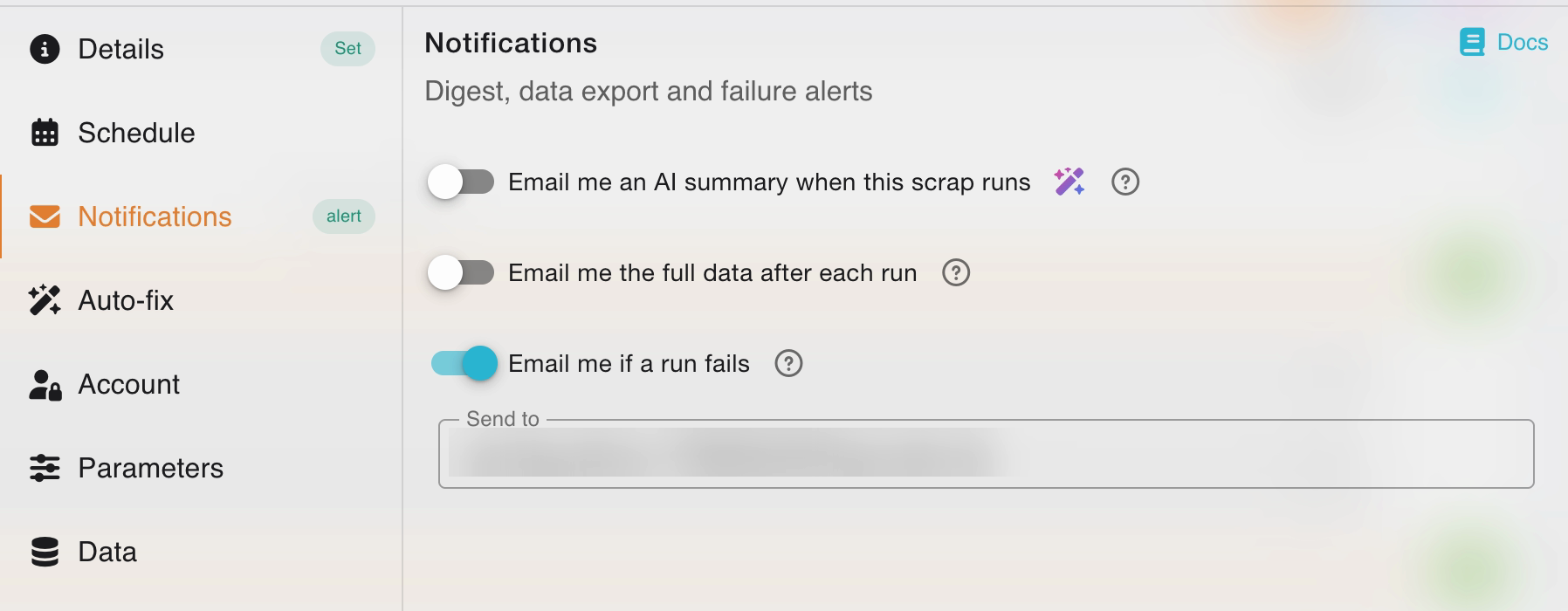
While you are in Settings, open Details and rename the scrap to something like "Contact page". The subject of the failure mail carries the scrap's name, and the name Trawl picks by default is taken from the website's address.
Repeat this for each page you watch. A few details from Trawl's documentation:
- The alert goes out when a run ends in an error or comes back with zero items. It is sent for scheduled runs, for runs you start yourself and for runs started through the API.
- It is separate from the mail that carries your data, which is only sent after scheduled runs.
- A run that works and still returns at least one row, even far fewer than usual, is not a failed run, so it sends no failure alert. To be told when a page empties out, write your sentence around content that must be there, so a changed page fails the run.
Why auto-fix is off for this check
Auto-fix is the feature that repairs a scrap when a website changes its layout. It is a good default for a scraper that collects data. It cannot bring back a page that no longer exists, and it changes when the failure mail is sent: while auto-fix is on, the plain "it failed" mail is held until auto-fix has had its look, and the mail you get next is about the repair, "recovered" or "needs review". When auto-fix looks and decides there is nothing to repair, the run page says Autofix skipped this run (selector timeout) and no email follows, so a deleted page can go by without a mail for that run. For a check whose only job is to tell you a page is gone, you want the plain failure mail straight away. That is why we switched it off in the wizard. You can change it later in Settings, on the Auto-fix tab. This is the one case where we switch it off: a monitor that only has to say "this page is gone". For a scraper that collects data, the opposite advice holds: keep auto-fix on.
Break a page on purpose
A monitor you have never seen fire is a monitor you do not trust yet, so break one. On our demo account we built a check on one post of our own blog, switched the failure mail on, then pointed the scrap at a page that does not exist. That is what your site looks like after someone deletes a page. Our blog answers that address with a real 404.
With auto-fix off, as set in the wizard, the failed run stops with an error. This is the run summary from trawl scraps doctor, without the hint line it prints at the end:
Blog post page  ● failed (error)
  Error:   Waiting for selector `article.article h1.article-title`
           failed
  Failed selector: article.article h1.article-title
  Blocked: no
  Proxy:   Tier 4
Notice the proxy tier: this run ended on Tier 4, the strongest, and took about 100 seconds, so a failed check can take longer than a good one. Run from a terminal, the command exits with code 1:
$ trawl run 6adcb578c02095a879659623
✗ 422 Unprocessable Entity: Waiting for selector
  `article.article h1.article-title` failed. TimeoutError: ...
  (stack trace trimmed)
That error says what was missing, not why. The reason is on the run itself. This is what trawl run-info <run id> --json printed for that run, trimmed to the useful lines:
{
  "status": "error",
  "failureKind": "selector",
  "selector": "article.article h1.article-title",
  "emptyContext": {
    "selectors": {
      "article.article": 0,
      "h1.article-title": 0,
      "time.byline-meta-date": 0
    }
  }
}
All three things the check looks for are missing. Open the failed run in the web app and you get the same story in words: Page layout changed, the selector that timed out, and HTTP 404.
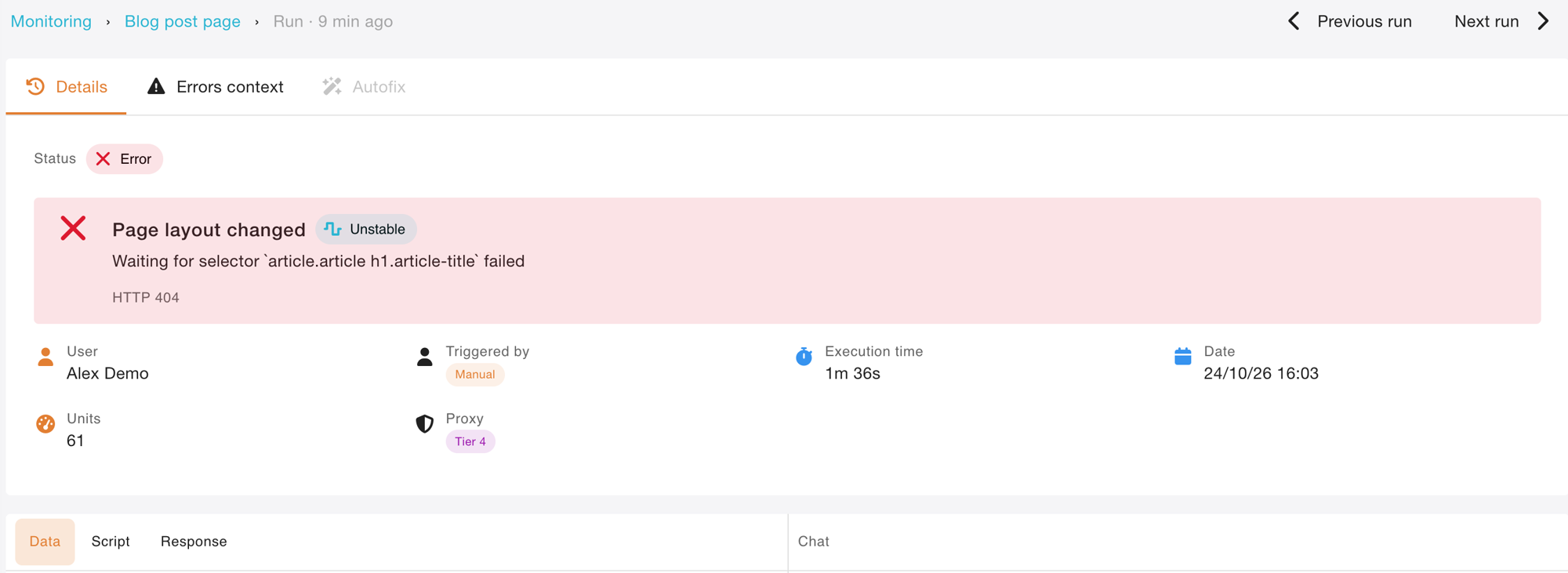
What the mail says
The failure mail is short. Its subject is Trawl failed : followed by your scrap's name, for example Trawl failed : Contact page. The body says the scrap failed its last run, shows what the run returned, and has an Open the run button that lands on the run page. At the bottom, it tells you that you get it because failure alerts are on for that scrap.
Three failures in a row
If a scrap fails three runs in a row, Trawl stops sending its scheduled runs for a while, so a page that stays broken does not use up compute every day. It emails you to say so, to the same address as the failure alerts. That mail replaces the ordinary failure mail for that run, so you never get two about the same run. The schedule itself stays as you set it. From a terminal, trawl list --unhealthy shows what is in that state. After a third failed run, with the id column trimmed:
title           health
Blog post page  ⚠ failing 3 runs (since 24/10/26 16:03)
Once the page is back, start one run by hand: the first clean run clears the state at once. Left alone, Trawl lets a scheduled run through by itself after about two weeks to check. We put the address back and ran the check:
$ trawl run 6adcb578c02095a879659623
Scrap 6adcb578c02095a879659623 run complete
That run exited with code 0, and the scrap no longer showed up in trawl list --unhealthy.
The same check from a terminal
You need Node 22.12 or newer. We ran these commands on version 4.0.4 of @trawlme/cli.
npm install -g @trawlme/cli
trawl login
trawl create https://yoursite.com/contact \
  --prompt "The phone number and the opening hours on the contact page." \
  --no-autofix
trawl create builds the scrap the way the wizard does, with the same wait, and prints its id. A scrap created this way runs weekly on Monday at 07:00 UTC and, like the wizard, switches the summary mail on with your account email as recipient. Add --no-digest if you only want the failure mail.
The wizard sets no failure alert and neither does the command line, so add it. Setting the alert is a change to an existing scrap, which needs the session from trawl login, not an API key:
trawl scraps update <id> --alert you@example.com
trawl scraps update <id> --title "Contact page"
trawl scraps update <id> --cron "0 7 * * *"
Each command answers with the field it changed, for example alert: you@example.com. The last line moves the check from weekly to every day at 07:00 UTC.
To run a check from your own scheduler or a deploy script, trawl run <id> waits for the run to end and exits with 0 when the page passed and 1 when it failed, as shown above. A key created in the dashboard is enough for run:
TRAWL_API_KEY=trawl_xxx trawl run <id> || echo "contact page check failed"
Want a check on your own pages? Start free on Trawl, 10,000 free compute and no card.
What this does not do
Trawl checks the pages you name, on the schedule you pick. It does not crawl your whole site or follow every link, and a daily or weekly look is not a second-by-second alarm. For a garage, a hotel or a small shop that is usually the right size: the few pages that bring in customers get looked at on a schedule, and you hear when one of them stops showing what it should.
Developers who want the larger picture of watching production with scheduled scrapers will like synthetic monitoring without a vendor. The Monitoring page described in what Trawl 3.2 added shows every check on one screen, with the cause of each failure.
Disclaimer: Trawl provides scraping infrastructure. Users are responsible for ensuring their use complies with applicable laws and website terms of service. This article is for educational purposes only.
Written by Pierre | November 2026